


What Instagram’s AI Detection Looks At
Instagram can add an “AI info” label when it detects that a photo or video was generated or significantly edited with AI. One signal Meta can use is technical metadata stored inside the file, including industry-standard C2PA and IPTC signals. Meta also says it uses other detection methods, so removing metadata alone does not guarantee that an AI label will disappear. Meta’s documentation explains how its AI labeling system works.
If you’re searching for how to remove AI info from Instagram posts or how to remove AI info from Instagram Stories, metadata removal is one step you can take before uploading. However, it should not be treated as a guaranteed way to bypass Instagram’s AI detection.
- Meta AI tools: Content created or edited with Meta’s AI tools can receive an AI disclosure.
- AI metadata: Meta can detect industry-standard signals such as C2PA and IPTC metadata from supported third-party AI tools.
- Other detection methods: Meta says it is also developing technology that can identify AI-generated content when invisible markers are missing.

Before You Remove AI Metadata: What It Can and Can’t Do
- It can: Remove hidden file information, including some metadata identifying the software or tool used to create or edit an image.
- It may not be enough: Instagram can use other signals, including technical indicators and its own detection technology.
- It cannot guarantee removal of an AI label: There is currently no reliable method to remove an AI label organically once Instagram has detected AI-generated content.
Meta has specifically said it is working on classifiers that can detect AI-generated content even when invisible markers have been removed.
Also check:Instagram Posting Crypto Stories? Fix the No-Login Hack
What You Need
- The original image file saved on your phone or computer
- An internet connection
- A metadata removal tool, such as Metadata2Go
How to Remove AI Metadata From an Image
Step 1: Keep a Backup
Save a copy of your original image before removing its metadata. This gives you a backup if you need the original file later.
Step 2: Open a Metadata Removal Tool
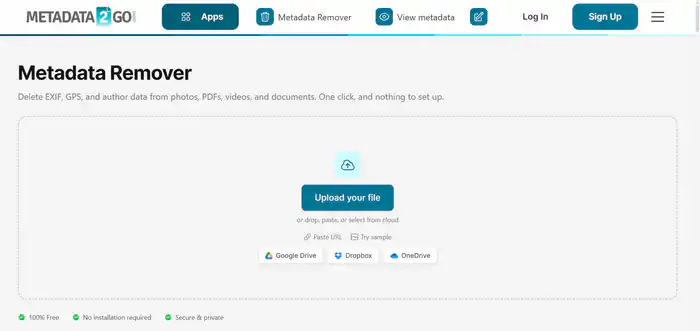
Open https://www.metadata2go.com/delete-metadata in your browser.
Step 3: Upload Your Image
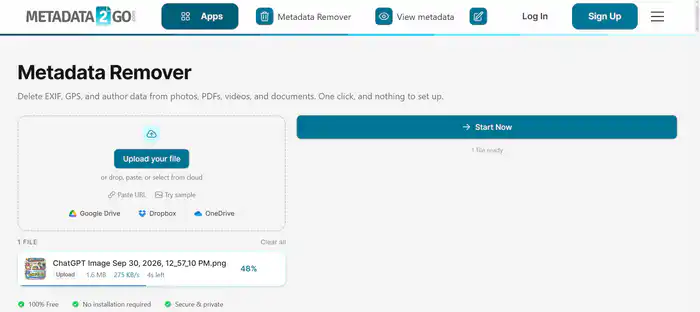
Click Upload your file and select the image from your device.
Step 4: Delete the Metadata
Click Start Now to process the file and remove available metadata.
Step 5: Download the Cleaned Image
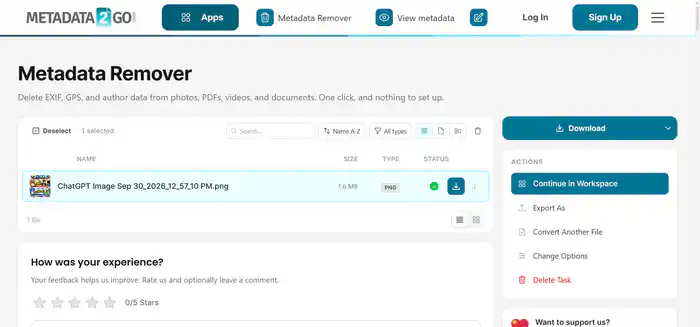
Click Download to save the processed image.
Step 6: Check the Metadata
Use your computer’s file properties or a metadata viewer to check whether the available metadata has been removed.
- Windows: Right-click the file → Properties → Details.
- Mac: Open the image in Preview → Tools → Show Inspector.
Step 7: Upload the Image to Instagram
Upload the cleaned image to Instagram as you normally would. Removing metadata may remove some technical AI signals, but it does not guarantee that Instagram will skip its AI labeling process.
How to Remove AI Info From an Instagram Post
If you’re specifically searching for how to remove AI info from an Instagram post, there is an important distinction. You can remove available metadata from the image before uploading, but Instagram may still identify AI-generated content through other signals. Meta says its current system can distinguish between content detected as AI-generated and content that was only modified or edited with AI. :contentReference[oaicite:2]{index=2}
For AI-generated content, there is no guaranteed method to permanently remove the platform’s disclosure after detection.
How to Remove AI Info From an Instagram Story
For users searching how to remove AI info from an Instagram Story, the same principle applies. Cleaning an image’s metadata before uploading can remove some embedded technical information, but it cannot guarantee that Instagram will not detect or label the content.
If the Story was generated or substantially altered with AI, the appropriate approach is to use Instagram’s available AI disclosure controls rather than relying on metadata removal.
Can You Bypass the Instagram AI Detector?
“Bypass Instagram AI detector” is a common search query, but metadata removal should not be considered a reliable bypass technique. Meta says it uses industry-standard signals and is developing additional classifiers to identify AI-generated content even when invisible markers are missing. :contentReference[oaicite:3]{index=3}
In other words, removing metadata can change what information is embedded in the file, but it does not make an AI-generated image undetectable.
Privacy and Safety Tips
- Keep an original backup before modifying metadata.
- Don’t upload private or sensitive images to third-party websites unless you trust the service.
- Image metadata can contain information such as device and location details, so reviewing it can also be useful for general photo privacy.
Should You Still Disclose AI-Generated Content?
Yes. If your content was generated or substantially altered with AI, use Instagram’s available disclosure options where applicable. Meta says it labels AI-generated content to provide transparency and requires disclosure for certain digitally created or altered realistic video and audio. :contentReference[oaicite:4]{index=4}
Removing metadata does not remove the underlying AI origin of the content. If Instagram detects other AI signals, an “AI info” label may still appear.
How to Turn On AI Content Disclosure on Instagram
For AI-Generated Profiles
- Go to Profile → Edit Profile.
- Find the AI-generated profile option and enable it.
For Individual Posts or Reels
- Upload your content and reach the final posting screen.
- Open Advanced settings.
- Enable the available AI disclosure option.
Quick Summary
- Back up your original image.
- Open a metadata removal tool.
- Upload the image and remove available metadata.
- Download and check the cleaned file.
- Upload it to Instagram.
- Remember that metadata removal does not guarantee removal of an “AI info” label.
- Disclose AI-generated content when applicable.
Must check: The Best New Inventions of 2026 : The Future is Shipping
Frequently Asked Questions
Can removing metadata bypass Instagram’s AI detector?
No method is guaranteed. Metadata removal can eliminate some technical signals, but Meta says it also works on other methods of identifying AI-generated content. :contentReference[oaicite:5]{index=5}
How do I remove AI info from an Instagram post?
You can remove available metadata before uploading, but this does not guarantee that Instagram will remove or avoid an AI disclosure.
How do I remove AI info from an Instagram Story?
Clean the image’s available metadata before uploading if privacy or file metadata is your concern. Instagram may still detect AI content through other signals.
Can I remove an AI label organically?
There is no guaranteed organic method to remove an AI label from content that Instagram has identified as AI-generated. The label is controlled by Instagram’s detection and disclosure systems.