Imagine running an AI assistant on your laptop without sending every prompt to a cloud service, paying for every API request or uploading sensitive files to a remote server. You could build software, analyse documents, generate images and run AI agents on hardware sitting right in front of you.
That is the future NVIDIA wants to sell with RTX Spark, its new computing platform for premium Windows laptops and compact desktops.
Available from October 16, 2026, RTX Spark brings NVIDIA’s Blackwell graphics architecture, its CUDA software ecosystem and an Arm-based Grace CPU into a single superchip. Compatible systems offer up to 128GB of unified memory and up to one petaflop of FP4 AI performance. Laptop prices start at approximately $2,599 in the US, putting the first wave firmly in premium territory.
The pitch is compelling, especially for developers, creators and people who want to experiment with local AI agents. Yet the early evidence raises an important question: does RTX Spark deliver a genuinely better everyday computer, or is it a specialist AI machine disguised as a laptop?
For buyers in the US and UK, that distinction could be worth thousands of dollars or pounds.
RTX Spark makes local AI more practical, but its value depends on your workload, the specific laptop configuration, and whether its performance advantages outweigh the price and compatibility compromises.
What is NVIDIA RTX Spark?
RTX Spark is NVIDIA’s new platform for Windows PCs that combines CPU processing, RTX graphics and AI acceleration in a tightly integrated system-on-chip.
It is designed to bring together three workloads that traditionally compete for space, power and cooling in a laptop:
- Local AI: Running language models, AI agents and other inference workloads directly on the computer.
- Creative production: Accelerating video editing, 3D rendering, image processing and AI-assisted workflows.
- Gaming: Using RTX technologies such as ray tracing, DLSS and NVIDIA Reflex in supported games.
NVIDIA announced the platform as a new direction for Windows PCs, with laptop and desktop partners bringing it to market. The first laptop wave includes ASUS, Dell, HP, Lenovo, Microsoft and MSI. Compact desktop systems are also part of the broader RTX Spark strategy.
Must Read:OpenAI Mathematics: What the 377 Results Actually Show
The important distinction is that RTX Spark is not one individual laptop. It is a hardware and software platform appearing in products with different memory capacities, displays, cooling systems and prices.
That means a review of one RTX Spark laptop cannot automatically describe every RTX Spark computer.
NVIDIA RTX Spark specifications
| Specification | RTX Spark platform |
|---|---|
| CPU architecture | NVIDIA Grace, based on Arm |
| CPU cores | Up to 20 |
| GPU architecture | NVIDIA Blackwell RTX |
| CUDA cores | Up to 6,144 |
| AI performance | Up to 1 petaflop FP4 |
| Unified memory | Up to 128GB |
| Operating system | Windows 11 |
| AI software ecosystem | CUDA, TensorRT and compatible local AI tools |
| Creative workloads | Supported RTX-accelerated creative applications |
| Gaming features | DLSS, ray tracing and Reflex in supported titles |
| Starting laptop price | Approximately $2,599 in the US |
| Launch availability | October 16, 2026, with availability varying by model and market |
These are platform-level maximums, not specifications guaranteed on every machine. Entry-level and premium configurations can differ substantially in CPU cores, GPU resources, and memory.
The real reason to consider RTX Spark: Local AI
Most people encounter AI through a website or an application connected to a remote service. The model runs elsewhere, your request travels over the internet, and the result returns to your device.
Local AI changes that arrangement. The model runs on your own hardware, subject to the model’s requirements and the computer’s capabilities.
This can offer several advantages:
- More control over private information. Documents, source code and other inputs can remain on the computer when the entire workflow operates locally. That can be useful for developers, researchers and businesses handling confidential material.
- Less dependence on cloud charges. Once the hardware is purchased, local inference can reduce recurring API or per-prompt costs. It does not eliminate the cost of electricity, software, maintenance or the initial investment.
- More freedom to experiment. Developers can test models, adjust workflows and build agents without relying exclusively on a hosted service.
- Potentially better offline access. Local models can continue working without an internet connection, provided the model and required software are already installed and the task does not depend on cloud services.
NVIDIA says RTX Spark can run models with up to 120 billion parameters and supports local development through its CUDA and TensorRT ecosystem. Its unified memory is central to that proposition because large models need room for their weights, working data and runtime overhead.
However, local AI is not automatically more private, more accurate or faster than cloud AI. An application might still send data to external services, while a smaller local model may perform worse than a more capable cloud model.
Local AI is a choice about control and economics, not a universal guarantee of better intelligence.
RTX Spark for Local AI: What can it actually run?
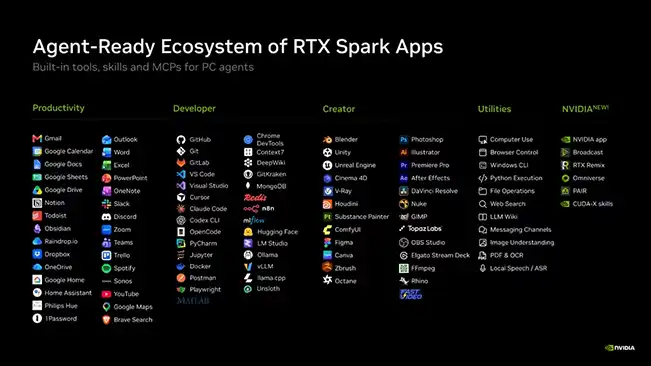
NVIDIA’s launch ecosystem includes support for AI agents and local model tools, with products such as Hermes, OpenClaw and GitHub Copilot highlighted in launch coverage. The available features and the amount of work each agent can perform depend on the application, model and permissions configured by the user.
One particularly interesting launch development is NVIDIA’s Nemotron 3.5 Bolt model. The Next Web reports that this model has 74 billion parameters, with nine billion active at a time, and that NVIDIA has packaged it to run within 24GB of memory on supported configurations. The report also gives its Artificial Analysis Intelligence Index score as 21, compared with 58 for the leading model in that comparison.
That comparison is useful because it puts the hardware promise into perspective. Running a large model locally is an achievement, but model size alone does not tell you how useful its answers will be.
A 74-billion-parameter model that fits on a computer is not automatically better for every task than a smaller model or a cloud-hosted alternative. Accuracy, reasoning, speed, context length and tool use all matter.
Must Check:There’s An AI For That: Finding AI Tools Made Easier
What about AI agents?
An AI chatbot answers questions. An AI agent can go further by using tools, handling multi-step workflows and interacting with applications, depending on its configuration.
On a suitable RTX Spark laptop, a local agent might help with tasks such as:
- Searching and summarising local documents.
- Assisting with software development.
- Working with supported creative applications.
- Running multi-step workflows through approved tools.
- Automating repetitive tasks within configured permissions.
But there is an important security consideration. An agent that can access files, applications or accounts can also make mistakes with them. Local execution does not eliminate the risk of destructive actions, prompt injection, or unauthorised access.
NVIDIA and Microsoft have highlighted runtime and container-based controls for restricting what supported agents can do. Buyers should still review permissions carefully rather than assuming that an on-device agent is inherently safe.
Also Check:How to Remove AI Metadata From Images Before Posting on Instagram
Why 128GB of unified memory matters
The headline specification most likely to attract AI developers is RTX Spark’s support for up to 128GB of unified memory.
On a conventional PC, system memory and dedicated GPU memory are usually separate pools. Large AI workloads can run into GPU-memory limits even when the computer has substantial system RAM available.
Unified memory gives the CPU and GPU access to a shared memory pool. On RTX Spark, that architecture can make it practical to load larger models and creative projects than a smaller-memory system could accommodate.
| Spec | N1X Entry Tier | N1X Top Tier |
|---|---|---|
| Grace CPU cores | 18 | 20 |
| Blackwell GPU cores | 5,120 | 6,144 |
| Unified memory options | 24GB–64GB | Up to 128GB |
| NVIDIA-claimed AI compute | Not disclosed | Up to 1 petaflop |
| NVIDIA-claimed max context window | Not disclosed | Up to 1 million tokens |
| Example system (entry config) | Surface Laptop Ultra, 24GB/512GB – $2,599.99 | — |
| Example system (top config) | — | Surface Laptop Ultra, 128GB/1TB – $5,899.99 |
Source: tech-insider.org
NVIDIA also says its platform can handle 3D scenes exceeding 90GB and models with up to 120 billion parameters.
There are three caveats buyers should understand:
- 128GB is a maximum, not a standard configuration. Some of the more affordable laptops have significantly less memory.
- Memory capacity does not guarantee speed. Performance depends on the model, numerical precision, memory bandwidth, software, and other hardware limits.
- Shared memory is not all available to a model. The operating system, applications, and GPU workloads also need resources.
If your work involves large local models, 3D scenes or multiple demanding applications, memory capacity could be a deciding factor. If you mostly use a browser-based chatbot, ordinary productivity software and occasional AI features, paying a premium for 128GB may be difficult to justify.
Performance: Impressive potential, mixed early results
RTX Spark has an unusual challenge: it is being positioned as an AI workstation, a creator’s laptop and a gaming machine at the same time.
Those jobs have different performance requirements. A chip can excel at AI inference and GPU-accelerated creative work while remaining less impressive in CPU-heavy tasks or games that depend on software compatibility.
Early coverage reflects that complexity.
The Verge’s first-week impressions describe strong AI and creative potential, premium hardware and large memory configurations, but also report trade-offs involving heat, fan noise, battery life, CPU performance and Windows-on-Arm compatibility.
The Indian Express’s early hands-on coverage of the ASUS ProArt P16 is more positive about the system’s initial performance and its ability to maintain performance on battery. However, it is an early hands-on assessment rather than a complete, long-term evaluation of every RTX Spark configuration.
These findings are not necessarily contradictory. Different laptops have different cooling systems, memory configurations and power limits, and different reviews measure different workloads.
The sensible conclusion is that RTX Spark shows promise, but buyers should not treat a single headline benchmark as a universal performance score.
The store-floor FurMark result needs context
A report from VideoCardz describes a Reddit user running FurMark on an ASUS ProArt P16 display laptop with 24GB of unified memory. The user reportedly observed around 123 frames per second at 1920 × 1080. VideoCardz compared that displayed result with database figures for other GPUs, while explicitly noting that it was not a final benchmark score.
It is an interesting early data point, not a reliable verdict on RTX Spark’s graphics performance.
FurMark is a graphics stress test, not a representative sample of gaming performance or local AI speed. A brief result from a retail demo unit cannot establish sustained performance, thermal behaviour or the performance of higher-end configurations.
For buyers, the more useful evidence will be repeatable tests across the exact laptop model they intend to purchase: AI tokens per second, application export times, sustained gaming performance, power draw and battery life.
Gaming on RTX Spark: A bonus, not the whole buying case
NVIDIA has built its reputation around graphics, so it is unsurprising that gaming is part of the RTX Spark story.
The platform supports technologies including ray tracing, DLSS and Reflex in compatible games. NVIDIA has also promoted a broad launch game list and performance benefits from its graphics technologies.
Yet buyers should distinguish between graphics capability and compatibility.
RTX Spark uses an Arm-based CPU rather than the x86 processors common in Windows gaming laptops. Windows on Arm can run many applications, including some through emulation, but not every game, launcher, anti-cheat component or peripheral behaves identically to its x86 counterpart.
Early coverage suggests that gaming results vary, particularly in CPU-bound games and titles affected by compatibility limitations.
That makes RTX Spark difficult to recommend purely as a gaming laptop. If gaming is your main priority, compare it with conventional Windows laptops using dedicated GeForce GPUs at the same price. Check performance in your actual games, including anti-cheat support and whether the title runs natively or through emulation.
If you want a computer primarily for local AI and creative work, with gaming as a secondary benefit, RTX Spark becomes a more interesting proposition.
Must Check:Nothing Headphone (1) Pro Review: Is It Worth $399?
Battery life, heat and fan noise: The laptop trade-off
A powerful processor does not exist in isolation. It needs power delivery, cooling and enough battery capacity to sustain its workload.
NVIDIA promotes RTX Spark as an efficient platform for portable AI and creative work. Early reviewers, however, have reported variable battery endurance, heat and audible fans under demanding workloads. The Verge’s early impressions put battery life in the region of five to six hours for the systems it discussed, depending on use. That should not be treated as a universal result for every RTX Spark laptop.
The distinction between light use and heavy use is especially important. Browsing and writing documents can place very different demands on a laptop than running a large local model or rendering a complex scene.
If you plan to run AI agents for extended periods, consider whether a laptop is even the right form factor. NVIDIA’s compact RTX Spark desktop systems are designed for workloads that can remain at a desk, including personal AI agents running for long periods.
For frequent travel, do not rely solely on manufacturer battery claims. Look for independent tests that match your intended workload and check whether performance changes significantly when unplugged.
RTX Spark price: What US and UK buyers should know
NVIDIA’s initial laptop range starts at approximately $2,599 in the US, with actual pricing varying by manufacturer and configuration. The first wave includes systems from ASUS, Dell, HP, Lenovo, Microsoft and MSI.
That starting price makes RTX Spark a considered purchase rather than a casual upgrade. The premium models can cost substantially more, especially when configured with 128GB of memory, high-end displays and large SSDs.
US buyers
For US buyers, compare the total price of the exact configuration with conventional laptops that have dedicated GeForce graphics, high-memory creator systems and Apple MacBook Pro models.
The question is not simply whether RTX Spark is fast. It is whether its local-AI capabilities save enough time, cloud spending or workflow friction to justify the difference.
UK buyers
UK shoppers should check the manufacturer’s UK store and authorised retailers for local pricing, VAT-inclusive totals, delivery dates and warranty terms.
Do not convert the US starting price directly into pounds and assume that is the UK retail price. Configurations and regional pricing can differ, and the most affordable US model may not be available in the same specification in the UK.
Is the 24GB version enough?
For experimentation with smaller models and general creative work, a 24GB configuration may be sufficient, depending on the workload. Larger models and demanding multitasking can require substantially more memory.
If local AI is your main reason for buying, establish the memory requirements of your target models before choosing a configuration. Buying less memory to save money may undermine the very capability that attracted you to RTX Spark.
Must check:Apple HomeView is here. But does your home actually need it?
RTX Spark vs a conventional gaming laptop vs a MacBook Pro
| Buying factor | RTX Spark laptop | Conventional GeForce gaming laptop | MacBook Pro |
|---|---|---|---|
| Main appeal | Local AI, CUDA, creation and gaming | Dedicated graphics and broad Windows gaming support | Integrated performance, battery efficiency and creative workflows |
| Local AI | Strong potential with compatible CUDA tools and sufficient memory | Strong with supported GPU-accelerated tools and sufficient VRAM | Capable with compatible local AI tools; model and memory limits vary |
| Memory architecture | Unified CPU/GPU memory, up to 128GB on selected models | Usually separate system RAM and dedicated GPU memory | Unified memory |
| Gaming compatibility | Depends on Windows-on-Arm support and individual titles | Generally the safer choice for mainstream Windows PC gaming | Not the first choice for every PC game; compatibility varies |
| Portability | Depends on laptop design and workload | Often heavier, with gaming-focused cooling | Depends on model; generally strong efficiency |
| Best suited to | Developers, local-AI users and creators who need the platform | Gamers and GPU-focused Windows users | Buyers prioritising macOS, creative work and balanced portable performance |
This is a category-level comparison, not a claim that every model in one category beats every model in another. Specific configurations, software and workloads can change the outcome.
Who should buy RTX Spark?
RTX Spark makes the most sense for buyers who have a concrete reason to run demanding workloads locally.
Consider it if you:
- Develop and test AI models or agents.
- Need CUDA compatibility for your software stack.
- Work with large local models or memory-heavy creative projects.
- Want to keep sensitive data on-device when your workflow supports it.
- Use GPU-accelerated creative applications such as supported Adobe tools.
- Can justify the price through work, research, or regular use.
Think twice if you:
- Mostly use web-based AI chatbots.
- Need the best gaming performance for your money.
- Depend on specialist Windows applications or peripherals that may not support Arm.
- Expect long battery life during heavy AI workloads.
- Are buying the lowest-memory configuration but want to run large models.
- Do not have a clear local-AI workflow yet.
For the last group, the most sensible move may be to start with existing cloud services or a more affordable computer. You can learn which models and workflows you actually use before committing to expensive local-AI hardware.
The security question: Local does not mean risk-free
Keeping AI workloads on your own computer can reduce exposure to external services, but it changes rather than eliminates security responsibilities.
An agent may need permission to read files, execute code, use a browser, or interact with applications. Giving it broad access can create risk even when the model itself runs locally.
Before enabling an AI agent, check what it can access, whether actions require approval, how it handles external content, and whether the application makes network requests. Use restricted permissions for experiments, particularly when working with personal files, company data, or credentials.
For businesses, local AI can be part of a privacy strategy, but it does not replace access controls, data governance or security reviews.
Also check: A smaller Xbox controller solves one problem. Does it create another?
Final verdict: RTX Spark is promising, but not for everyone
RTX Spark represents a meaningful change in how premium Windows computers can approach AI. Combining NVIDIA’s Blackwell GPU technology, Grace CPU architecture, CUDA software and up to 128GB of unified memory gives developers and creators a credible route to running demanding AI workloads locally.
Its strongest argument is not that it will replace every cloud service. It is that some users can bring more of their work onto their own machines, reducing dependence on remote compute and gaining greater control over their tools and data.
The weaknesses are equally important. Early reviews show mixed results across performance, battery life, cooling and compatibility. The price is high, and the Arm-based platform means buyers should verify that their essential applications and games work as expected.
Our buying advice: consider RTX Spark if local AI is a regular part of your work, you need the CUDA ecosystem and you have confirmed that the chosen configuration meets your model and memory requirements. If you mainly browse, play games or occasionally use an online AI assistant, its premium may be difficult to justify.
The future of local AI is exciting. But the best computer is not the one with the largest number on the spec sheet. It is the one that solves your actual problem without making you pay for capabilities you rarely use.