Imagine waking up, opening your app, and realizing you have an instagram story posting crypto scams to your followers. You panic, check your login activity, and find absolutely nothing out of the ordinary. No unrecognized devices. No new login alerts. You even have Two-Factor Authentication (2FA) enabled.
It feels like a ghost has hijacked your profile. How is it possible for an account to post without logging in?
If your account is suddenly sharing fake celebrity tweets or crypto withdrawal screenshots, you are a victim of the “Invisible Hack.” Here is exactly how this happens and the steps you need to take to secure your account today.
The Mechanics Behind an Instagram Story Posting Crypto Scams
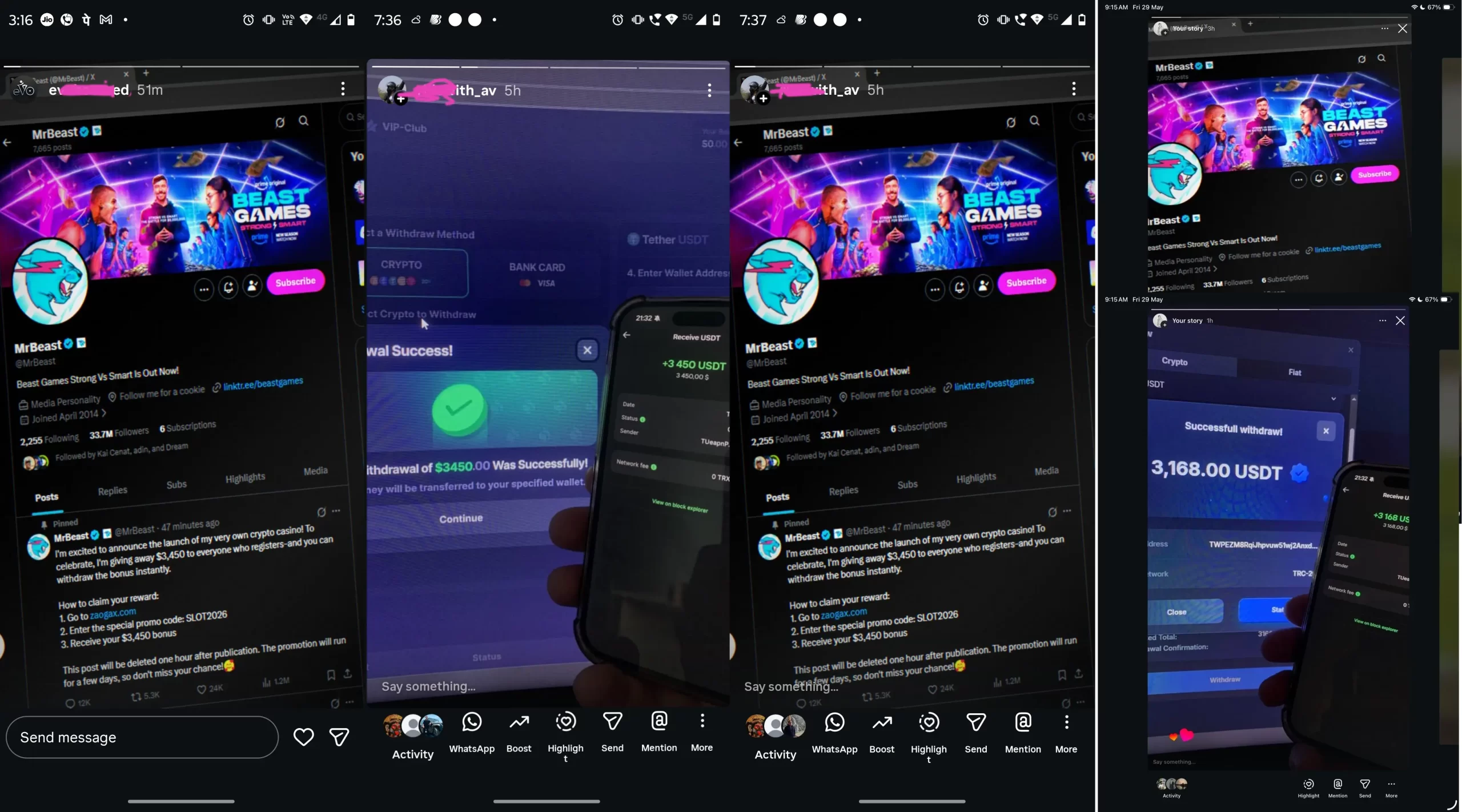
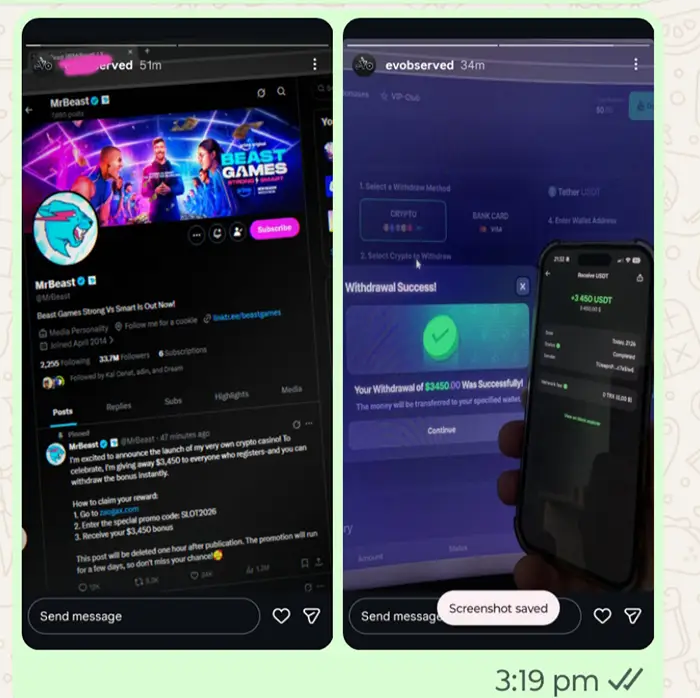
This specific wave of unauthorized posting is highly recognizable. The hackers aren’t trying to steal your identity; they are trying to scam your followers using your trusted account. The unauthorized stories usually feature:
- Fake Celebrity Endorsements: Doctored screenshots of tweets from figures like Elon Musk (claiming to launch a “SpaceX crypto exchange”) or MrBeast (promoting a “crypto casino” giveaway).
- Fabricated Proof of Wealth: Images showing massive Ethereum (ETH) balances in digital wallets or fake notifications of successful Tether (USDT) withdrawals.
- Sketchy Links and Promo Codes: Calls to action urging your followers to visit obscure websites (like “cisime.com” or “zaogax.com”) and use specific promo codes to claim free crypto.
If this is on your story, you need to act fast.
Also Check:Simple Hackathon Project Ideas (39+ Unique Ideas for 2026)
The “Invisible Hack”: How They Bypass Security

The most frustrating part of this hack is that the intruders never technically “logged in” to your account. This is why you didn’t get an email alert and why 2FA didn’t stop them. It typically happens in one of two ways:
1. Session Hijacking via Malware
When you log into Instagram on your computer’s web browser, the site creates a “Session Cookie”—a digital VIP pass that keeps you logged in. If you accidentally download “Infostealer” malware (often hidden in cracked software or sketchy email attachments), the malware quietly copies this session cookie.
The hacker then imports your cookie into their browser. Because they are using your exact session token, Instagram’s servers think the hacker is your computer. It bypasses 2FA completely because the session is already authenticated.
2. Rogue Third-Party Apps
Over the years, you may have linked your Instagram to third-party apps—follower trackers, scheduling tools, or quizzes. These apps use an API token for access. If one of these apps is compromised, sold to a malicious company, or suffers a data breach, hackers can use that existing authorized access to publish stories on your behalf in the background.
How to Exorcise the Ghost: Step-by-Step Fix
Simply changing your password on your regular computer might not work, especially if you have malware stealing the new cookies. Follow these steps precisely to lock the hackers out for good.
Step 1: Use a Clean Device
Grab your smartphone or a completely different computer. Do not use the PC you suspect might be infected.
Step 2: Nuke All Active Sessions
You need to invalidate the stolen session cookies. From your clean device, open the Instagram app:
- Go to Settings and Privacy > Accounts Center > Password and security > Where you’re logged in.
- Select your account.
- Manually log out of every single session, including the ones on devices you recognize.
Step 3: Revoke Third-Party Access
While still on your clean device, cut off any rogue apps:
- Go to Settings and Privacy > Website permissions > Apps and websites.
- Look through the “Active” list.
- Tap Remove on anything you don’t instantly recognize or no longer use.
Step 4: Change Passwords and Update 2FA
Now that the hacker’s access is severed, change your Instagram password to a strong, unique phrase. If you are using SMS for Two-Factor Authentication, switch to an Authenticator App (like Google Authenticator or Authy), which is much less vulnerable to interception.
Step 5: Clean Your Infected Machine
If this was a session hijacking attack, your primary computer likely has malware.
- Run a deep, offline scan using a reputable antivirus program.
- Clear all cookies and cache from your web browsers.
- If multiple accounts across different platforms (like X/Twitter or YouTube) are also compromised, you may need to back up your essential files and reinstall your operating system to ensure the Infostealer is completely gone.
Case Study: The Midnight Hijack During a Critical Launch
Case Study 1: How Cracked Software Hijacked Our Agency’s Accounts
Recently at our digital marketing agency, a video editor and a social media manager noticed that their personal Instagram profiles—and several of our clients’ accounts—were suddenly posting fake crypto scams. Strangely, only the accounts logged into their specific work laptops were affected. The cause? Both team members had recently visited a pirated software website (file.cr) to download a free system cleaner and a cracked movie downloader. Instead of helpful tools, they had accidentally installed an Infostealer malware, which quietly copied their active login sessions from their web browsers and sent them straight to hackers.
When we realized what happened, we immediately uninstalled the malicious apps and deleted their files. However, the cracked downloader required a computer restart to “change TCP settings.” After the reboot, the malware left a nasty parting gift: both laptops completely lost internet access. Our team spent over five hours trying every technical network fix available, but nothing worked. The malware had intentionally corrupted the core Windows internet files to lock us out and prevent antivirus updates from running.
In the end, we had to take the ultimate step: wiping the laptops completely and reinstalling Windows from scratch. This finally restored the internet and permanently erased the malware, allowing us to safely log out the hackers and secure our accounts. The lesson here is simple: never download cracked or pirated software on work devices. It only takes one bad click to give hackers full access to your digital life without them ever needing your password.
Must read:Hollyland Lark M2 Review – A No-Stress Wireless Mic
Case Study 2
I recently experienced this exact nightmare firsthand. In May 2026, I was managing the digital promotion for a major new clinic launch in Rewari. The momentum of the entire campaign was heavily reliant on our Instagram strategy, driving traffic directly to appointment booking links through a series of daily reels.
Just days before the launch, the account was hit by an “Invisible Hack.” A compromised third-party app—which had been authorized months prior for analytics and completely forgotten—was used to bypass our Two-Factor Authentication. In the middle of the night, the account began blasting out fake Tether (USDT) withdrawal screenshots and overriding carefully crafted reel captions with sketchy crypto links.
The stakes were massive. Every minute those scams stayed live, we were losing real, high-value clinic appointments, and the professional reputation of the campaign was bleeding out. Because the hackers never changed the password or triggered a new login alert, the initial panic was compounded by total confusion. I had to execute a rapid, aggressive lockdown protocol to salvage the campaign and secure the booking channels.
I found many similar cases on reddit. The identical one is here:Bruh, someone posted a crypto scam on my Insta while I was in an exam 😭
Final Thoughts
Seeing your face attached to a scam is incredibly stressful, but understanding the mechanics behind the attack is the first step to beating it. By regularly auditing your active login sessions, revoking old app permissions, and practicing good digital hygiene on your desktop, you can ensure your profile stays yours.