A full-size controller is perfectly at home on the sofa. Put it in a backpack, hand it to a young child or try using it with a phone on a train, and its size becomes less convenient.
Microsoft wants to change that with the Xbox Nano Controller, a compact wireless gamepad that keeps the familiar Xbox control layout while cutting down on size and weight.
Announced on October 14, 2026, the controller measures just over five inches long and weighs approximately 99 grams. It retains all 18 standard gameplay inputs, supports Xbox Wireless and Bluetooth, and uses a built-in rechargeable battery. Pre-orders are open at $49.99 in the US and £44.99 in the UK, with Microsoft Store listings giving November 4, 2026, as the release date.
The proposition is simple: make gaming easier to carry, more accessible to smaller hands and less expensive than buying a standard controller.
But a smaller controller is not automatically a better controller. Button spacing, trigger depth, grip comfort, and battery life can matter more during a gaming session than the dimensions printed on the box.
So, should you preorder the Xbox Nano, or stick with a conventional gamepad? Let’s look at what it offers, where it makes sense, and what buyers should check before spending their money.
Xbox Nano Controller specifications
| Feature | Details |
|---|---|
| Product type | Compact wireless gamepad |
| Length | Just over 5 inches |
| Weight | Approximately 99g (3.5oz) |
| Gameplay inputs | 18 standard inputs |
| Connectivity | Xbox Wireless and Bluetooth |
| Battery | Built-in rechargeable battery |
| Charging | USB-C, cable sold separately |
| Customisation | Programmable Action Button and button mapping |
| Xbox compatibility | Xbox Series X|S and Xbox One |
| Other compatible devices | Windows 10/11 PCs, compatible tablets, iOS, Android and select smart TVs |
| US price | $49.99 |
| UK price | £44.99 |
| Listed release date | November 4, 2026 |
Specifications are based on Microsoft’s product listings. Compatibility and available features can vary by device, operating system, and game.
Design and size: The biggest reason to buy it
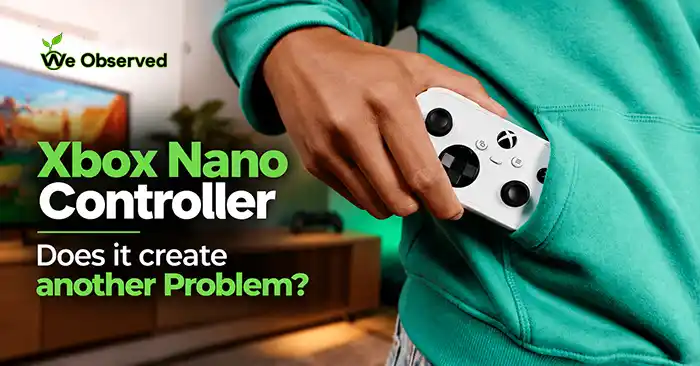
The defining feature of the Xbox Nano is its compact build. At around 99g, it is light enough to carry without adding much weight to a travel bag. Its length of just over five inches also makes it easier to slip into a larger pocket or backpack compartment than a conventional gamepad.
That matters for more than travel.
A smaller controller could make gaming more manageable for younger players whose hands struggle to reach the controls on a standard gamepad. It could also serve as a convenient second controller for family gaming, visits to friends, or occasional multiplayer sessions.
Microsoft describes the Nano as an entry-level, rechargeable controller designed for smaller hands and gaming on the go. The company’s message is that players can take a familiar Xbox experience to more places without carrying a full-size controller.
Also Check:GTA 6: Release Date, Price, Leaks & What to Know
However, the compact shape introduces an important question: how well does it fit different hands?
A smaller grip can reduce reach for some users, but it can also crowd the buttons for others. Early reporting notes that the Nano’s face buttons sit closer together and its triggers are shallower than those on a standard Xbox controller.
Those differences could be perfectly acceptable for casual play. They could also become frustrating in games that require precise trigger control or frequent, rapid button presses.
Our take: the size is a clear advantage for portability. Comfort is the part buyers should verify in person, especially if they plan to use the Nano as their main controller.
All 18 gameplay inputs remain
Making a controller smaller often means simplifying something. Microsoft says the Nano retains all 18 standard gameplay inputs, keeping the familiar Xbox control approach rather than reducing it to a handful of buttons.
That gives the controller broader potential than a basic mobile gamepad. It is designed for compatible console, PC, and mobile games that use a controller layout.
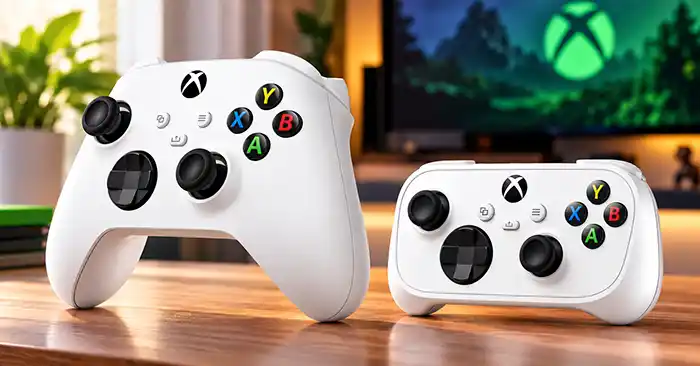
But keeping the same number of inputs does not mean the experience will be identical. The size and spacing of those controls still affect how quickly you can reach them and how accurately you can operate them.
For platformers, casual adventures, and games with less demanding inputs, the compact layout may work well. In racing games, shooters, and competitive titles, trigger depth and button reach may matter more.
If you are buying the Nano for a younger player, the smaller layout is worth considering. If you are buying it for competitive gaming, try it before relying on it for long sessions.
The programmable Action Button is a useful extra
The Nano includes a programmable Action Button that can provide quick access to functions such as screenshots, gameplay capture, or other shortcuts.
It is a practical addition for players who regularly save clips or take screenshots. Rather than navigating menus or remembering a button combination, they can assign a frequently used action to a dedicated control.
Microsoft also supports button mapping through the Xbox Accessories app on compatible Xbox consoles and Windows PCs. Some customisation options depend on the platform, and Windows setup may require a compatible USB-C cable.
Must Check:Xbox Game Pass October 2026: 9 New Games & More
This feature will not transform every game, but it adds flexibility without making the controller more complicated for basic use.
Rechargeable battery: Convenient, but remember the cable
One of the more meaningful differences between the Nano and a standard Xbox Wireless Controller is its built-in rechargeable battery.
The standard controller commonly uses replaceable AA batteries, although rechargeable battery accessories are available. The Nano’s integrated battery removes the need to swap batteries during normal use.
There is a catch: the USB-C charging cable is sold separately. Microsoft lists the cable as required for charging but does not include it with the controller.
That is not a major obstacle if you already own a compatible cable, but it is worth remembering when comparing the total cost.
Microsoft’s product information also cautions that battery life varies significantly with usage and connected accessories. I would not make a buying decision based on an assumed number of hours until reliable real-world testing establishes how long the Nano lasts on a charge.
For now, the rechargeable design is a convenience, while battery endurance remains an unanswered practical question.
Connectivity: Console, PC, phone and smart TV
The Xbox Nano supports Xbox Wireless for compatible Xbox consoles and Bluetooth for supported PCs, tablets, phones and smart TVs.
That flexibility could be its second-biggest advantage after portability. A player might use the same controller with an Xbox at home, a Windows laptop while travelling, and a compatible phone for supported games.
Must Check:PS5 Pro Shortage GTA 6: Why Sony Is Using a Lottery
Microsoft lists compatibility with Xbox Series X|S, Xbox One, Windows 10/11, Android and iOS. It also mentions select smart TVs. The company notes that some mobile and Bluetooth functionality depends on the device and software version.
Before buying, check both the controller’s compatibility and the requirements of the game you want to play. A phone supporting Bluetooth does not automatically mean every mobile game supports a controller.
Can you use it as a wired controller?
Microsoft confirms USB-C charging, but the official product information cited here does not clearly confirm wired gameplay through USB-C. Buyers who specifically need a wired connection should verify that feature with Microsoft before ordering.
Is the Xbox Nano good for cloud gaming?
Its compact design and Bluetooth support make the Nano a plausible companion for cloud gaming on compatible devices.
Microsoft has highlighted the controller alongside its Xbox app experience on select Samsung smart TVs. It has also announced US holiday promotions involving selected Samsung TVs and Meta Quest devices. Eligible new members in those promotions are due to receive a Nano Controller and two months of Game Pass Ultimate, subject to the offer’s terms.
These promotions show how Microsoft is positioning the controller beyond the traditional console setup. The idea is to let people use screens and devices they already own, where supported, rather than treating an Xbox console as the only way to play.
There are two important qualifications. First, cloud gaming requires a compatible service, supported device, and reliable internet connection. Second, the announced bundles are US offers, so buyers in the UK should not assume the same deal is available locally.
The Nano itself does not provide a Game Pass subscription or a library of games. It is the controller, not the entire gaming setup.
Xbox Nano Controller price and release date
Microsoft lists the controller at $49.99 in the US and £44.99 in the UK. Pre-orders are open, and the Microsoft Store lists November 4, 2026, as the release date. Local prices and availability may vary.
At these prices, the Nano is positioned below the standard controller in the US and UK, making it a potential lower-cost option for households that need another gamepad.
But price alone does not establish value.
If the compact design suits your hands and you frequently game across devices, the Nano could be worth the money. If you play mainly at home and already find a standard Xbox controller comfortable, the savings may not justify changing to a smaller layout.
Remember to account for the charging cable if you need to buy one separately.
What about availability in the UK and other markets?
Microsoft’s UK store lists the Nano at £44.99. Its US store lists $49.99, while the Canadian listing shows CAD $69.99. These regional differences reflect local pricing and should not be treated as direct currency conversions.
Microsoft has announced an initial rollout across numerous markets, with more countries expected to follow. However, an official Indian price and launch date were not confirmed in the supplied launch information or the official listings reviewed here. Indian buyers should check their local Microsoft Store or authorised retailers rather than assuming that a converted US price will be the retail price.
You may also like:CMF Speaker M vs Speaker S: Which Portable Speaker Should You Buy?
Xbox Nano vs standard Xbox Wireless Controller
| Buying consideration | Xbox Nano Controller | Standard Xbox Wireless Controller |
|---|---|---|
| Portability | Smaller and lighter | Larger and heavier |
| Grip | Compact, potentially better for smaller hands | More familiar full-size grip |
| Button layout | 18 inputs in a tighter layout | Conventional spacing |
| Triggers | Shallower, according to early reporting | Standard trigger depth |
| Battery | Built-in rechargeable battery | Replaceable AA batteries, with rechargeable accessories available |
| Charging | USB-C cable sold separately | Depends on battery setup |
| Best use | Travel, smaller hands and spare-controller duty | General-purpose gaming and longer sessions for players who prefer the larger shape |
The Nano wins on portability and built-in rechargeability. The standard controller remains the more familiar choice for players who prefer a larger grip and conventional button spacing.
Neither is automatically better for every game. The right choice depends on how the controller fits your hands and where you plan to use it.
Who should buy the Microsoft Xbox Nano Controller?
The Microsoft Xbox Nano Controller is aimed at a specific set of buyers. Its compact design makes the most sense when size is an actual problem to solve.
Consider buying it if you:
- Want a small controller for travel.
- Are buying for a younger player or someone with smaller hands.
- Need a spare controller for family gaming.
- Play across compatible Xbox, PC, and mobile devices.
- Prefer a built-in rechargeable battery.
- Want a lower-priced alternative to a standard controller.
Think twice if you:
- Have larger hands and prefer a spacious grip.
- Play competitive games that demand precise trigger control.
- Spend long sessions gaming and have not tested the fit.
- Need confirmed wired USB-C gameplay.
- Already own a controller that comfortably meets your needs.
The Nano is not necessarily a replacement for the standard controller. Its stronger use case is as a smaller alternative for players who value portability or find conventional gamepads too large.
Must check:OpenAI Mathematics: What the 377 Results Actually Show
Frequently asked questions
What is the Xbox Nano Controller?
It is Microsoft’s compact wireless gamepad. It measures just over five inches, weighs around 99g and retains 18 standard gameplay inputs.
How much does the Xbox Nano Controller cost?
It costs $49.99 in the US and £44.99 in the UK. Prices vary by market and retailer.
When is the Xbox Nano Controller released?
Microsoft Store listings give November 4, 2026, as the release date. Check your regional store for current availability.
Does the Xbox Nano Controller have a rechargeable battery?
Yes. It has a built-in rechargeable battery and charges via USB-C. The cable is sold separately.
Does it work with Xbox Series X and Series S?
Yes. Microsoft lists Xbox Series X|S and Xbox One as compatible consoles.
Can I connect the Xbox Nano Controller to a phone?
It supports Bluetooth connections with compatible iOS and Android devices. The phone, operating system, and game must support the required controller functions.
Is the Xbox Nano Controller suitable for children?
Microsoft specifically positions it as an option for smaller hands and younger players. The smaller grip may help, but comfort and button reach will still vary from person to person.
Is the Xbox Nano better than the standard Xbox controller?
Not universally. The Nano is smaller, lighter, and has a built-in rechargeable battery. The standard controller offers a larger grip and conventional spacing. Choose based on comfort and how you play.
Is the Xbox Nano Controller launching in India?
An official India price and launch date have not been confirmed in the official information reviewed for this article. Check Microsoft’s local store for updates.
Also check:Screentime to Cash on TikTok: What It Is and How to Deal With It
Final verdict: A smaller controller for a specific need
The Xbox Nano Controller is an appealing idea because it addresses a real inconvenience. Full-size gamepads are not always easy to carry, and they do not fit every player’s hands equally well.
At around 99g and just over five inches long, the Nano is genuinely compact. It retains the standard gameplay inputs, adds a programmable Action Button, uses a rechargeable battery and supports Xbox Wireless and Bluetooth across compatible devices.
Those are meaningful benefits for travellers, younger players, families and people who game across multiple screens.
The compromises deserve equal attention. Tighter button spacing and shallower triggers may affect comfort and precision, the charging cable costs extra if you do not already own one, and battery endurance still needs dependable real-world testing.
Our buying advice: choose the Xbox Nano if portability and a smaller grip are priorities. If you mostly play at home and already find the standard controller comfortable, there is no compelling reason to switch just because a smaller model exists.
A controller should fit the way you play. The Nano’s success will depend on whether its smaller size makes gaming more comfortable and convenient for you, not simply on how easily it fits in a pocket.